Event ID, registration page, results page
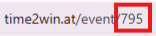
Each event has a different EVENT ID. These are the last numbers on the event page or in the backend: Enter your event ID here, and you will automatically receive a link to your registration page and the QR code for registration.
Overview
Each event has its own EVENT ID. It's the number at the end of the event URL on the public event page, and it's also shown in the backend:

Enter your Event ID (e.g. 1234) to generate the registration and results links with QR codes.
Enter an Event ID above to generate the link and QR code.
Enter an Event ID above to generate the link and QR code.
Registration page link & QR code
Once you know your Event ID, your registration page is available at:
https://time2win.at/event/<EVENT_ID>
Example — for Event ID 1234: https://time2win.at/event/1234
Share this URL directly, or turn it into a QR code with any QR generator. The QR code will lead participants straight to the registration page.
Results page link & QR code
The results page uses the same Event ID:
https://time2win.at/event/<EVENT_ID> — the results tab appears on the event page once results are published.
Example — for Event ID 1234: https://time2win.at/event/1234
You can turn this URL into a QR code and print it on bibs, banners or share it online.
Was this article helpful?
Your feedback helps us improve the docs.